
Module 2 of 3
Product rules
A product rule defines what a kind of product is: which properties belong together, and how strict each one is. It brings structure to your catalogue, and tells you when a product is finished.
What is a product rule?
A T‑shirt and a sofa need different details. The product type says what kind of product something is. Its product rule groups the properties that belong to that kind of product, and says how strict each one is. Together they define what a T‑shirt is in your catalogue.
Colour appears in both rules. It's the same property from module 1: you describe colour once, and every rule that needs it uses it.
What rules are for
Defining what a product is
Grouping properties turns a pile of loose details into "a T‑shirt" or "a sofa".
Structure
Every product of a type follows the same list, in the same order. Even where there was little structure before.
Consistency
Whoever adds a product, it's described like the others of its kind. Shoppers see the same details on each, and can compare.
The right fields
A product only shows the properties its rule lists. No sofa width on a T‑shirt.
Knowing when it's finished
Empty properties are shown as missing. Empty Required ones also block the product from going to your channels.
Your channels
Rules are instructions for your channels. On your online store they become the structure. Marketplaces check your products against their own. Module 3.
Rules bring structure
Without rules, every product is described its own way. With them, each kind of product has one clear shape. That brings consistency and predictability, for you and for your customers. You know what every T‑shirt has, and OneSila checks it. Shoppers find the same details on every T‑shirt, so they can compare and filter.
In this module you learn to
- Explain what a product rule does.
- Choose how broad a product type should be.
- Read a rule: what's required, what's optional, what the customer chooses.
- Decide what's Required in a rule.
- Know which products a rule change affects, and what moving a product to another type does.
Elsewhere, something similar
| Where, their word | How it compares to a product rule |
|---|---|
| MagentoAttribute set | The closest match: a set of attributes for one kind of product. Each OneSila rule becomes an attribute set on Magento (module 3). |
| Akeneo and other PIM systemsFamily | Close: the attributes a kind of product has, and which ones are required. |
| AmazonProduct type | Amazon's own version: its list of what a kind of product needs. You can't change it; you match yours to it (module 3). |
| ShopifyProduct type | Only a label on the product. No list of fields comes with it. |
| eBayCategory | Where an item is listed. eBay expects certain details per category, but a category isn't a list you define. |
How broad is a product type?
A product type groups products that are described the same way. Draw the line too wide or too narrow, and you pay for it later. The goal is a balance.
Toys
Teddy bears, board games and dolls in one type. The rule can't say what a toy needs: a board game has no fabric, a teddy bear has no number of players. Almost everything ends up Optional, so nothing blocks an unfinished toy. Marketplaces also split finer than "Toys", which makes matching harder later.
Green Teddy Bears
Then Blue Teddy Bears, Red Teddy Bears… The same list, many times over. Every change has to be made in each rule, and each one matched to every channel separately.
Soft Toy
Teddy bears, plush rabbits, any colour. They share one list of properties and the same checks. Colour is a property of the soft toy, not a type of its own.
Read a rule
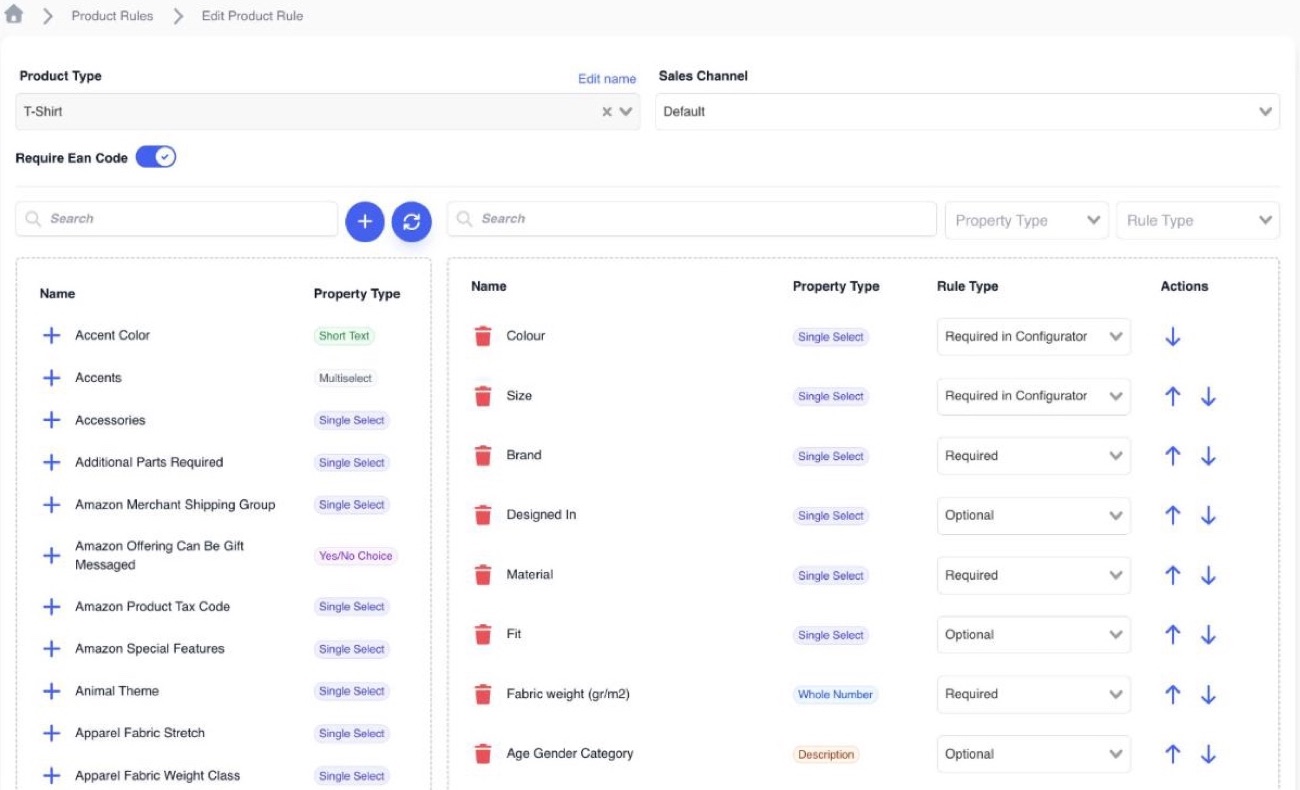
On the left is every property you have. On the right, the ones this product type needs. To add one, click the plus in front of its name, or drag it from the left column to the right. OneSila then asks for its rule type: how strict it is.
Need a property that doesn't exist yet? The round blue plus above the left column creates a new one, in a new tab. The round arrows next to it refresh the list. To remove a property from the rule, click its bin or drag it back to the left. Drag within the right column to change the order.
Fill in a product
Each product's Properties tab shows exactly the properties from its rule, in the same order. You only fill in the values.
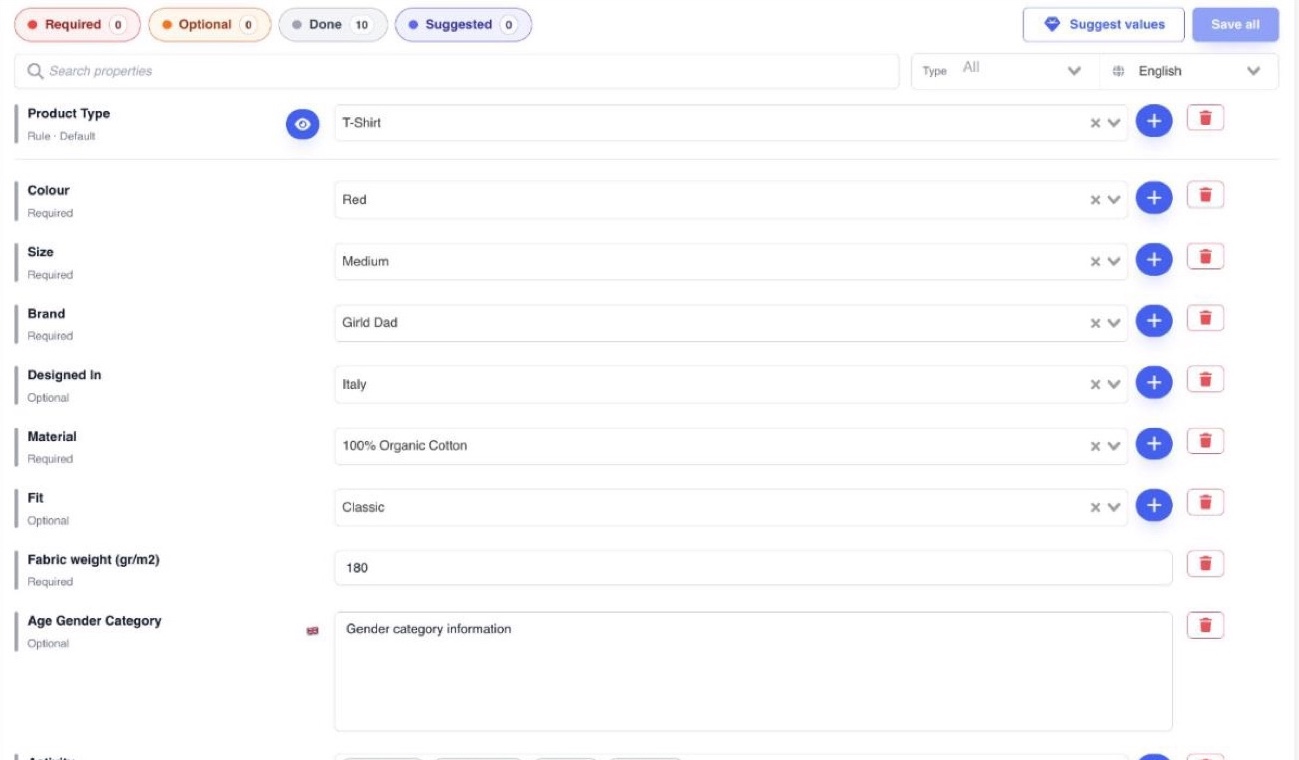
Required
How many required properties still have no value. This is the number to get to zero.
Optional
How many optional properties are still empty. Nice to fill, not a blocker.
Done
How many properties already have a value.
The product type sits at the top of the Properties tab. Change it, and the product follows another rule: other properties, other checks.
What the customer chooses
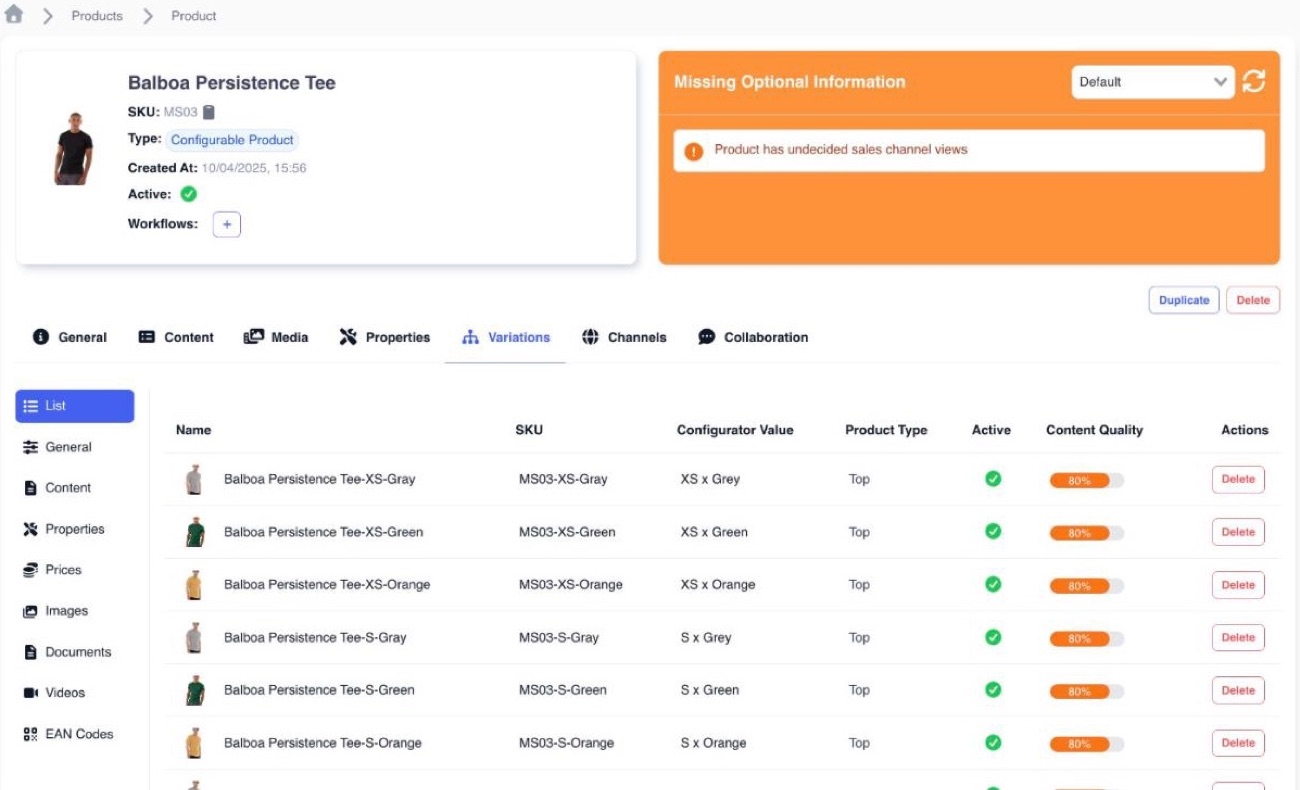
Many T‑shirts come in several sizes and colours. Only the size and colour change; everything else stays the same. So you don't make 15 separate T‑shirts. You make one, with versions.
The parent holds the versions
Think of the parent as a folder. Each version inside is a full product with its own SKU, following the same rule. The properties set to Required in Configurator tell the versions apart.
Not every product has versions
A T‑shirt that comes in one size and one colour has no versions: it's a Simple Product. There, Required in Configurator simply acts as Required.
Decide what's Required
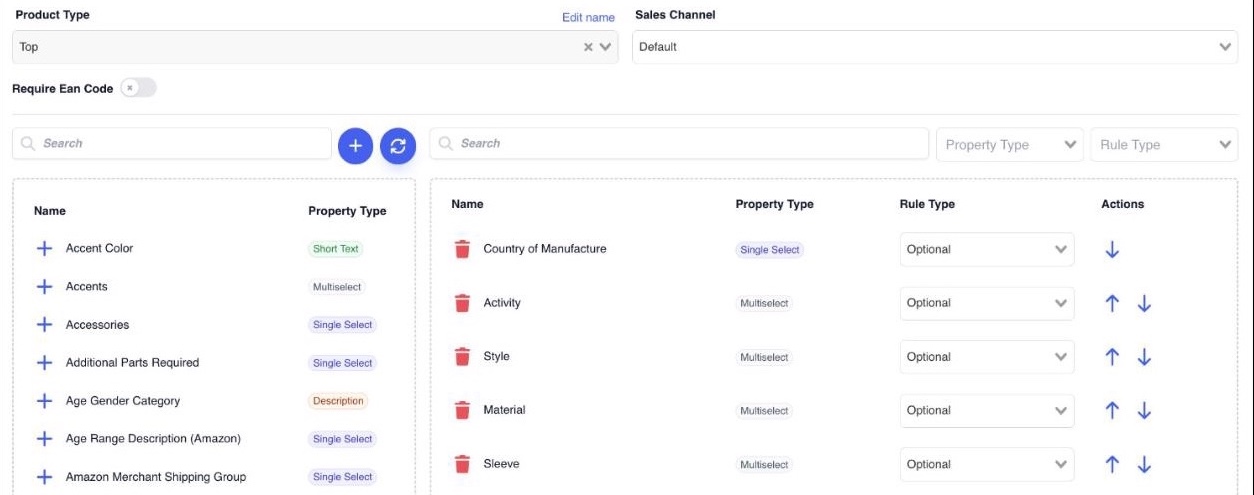
With everything Optional, gaps still show, but nothing blocks. Required properties do block: until they have a value, the product isn't sent to your storefront or marketplaces.
What to switch to Required
Changing a rule
A rule isn't a setting for one product. Any change will change the rules for every product of that type. On a rule with 678 products, that's 678 products, not 1.
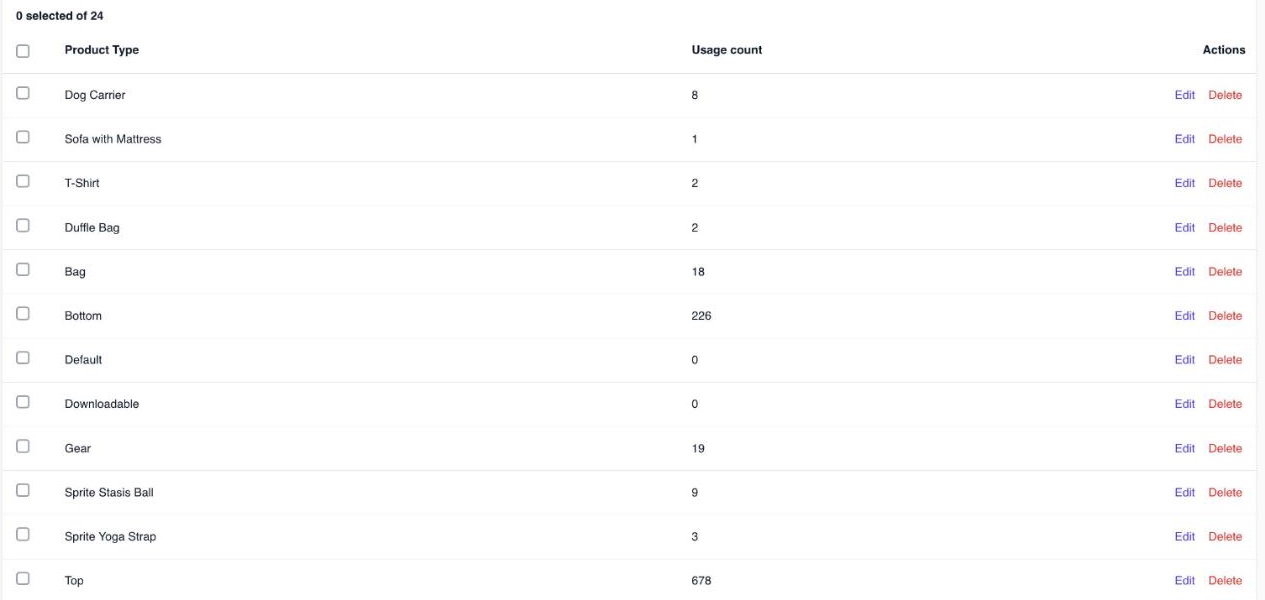
Before you change a rule, check how many products follow it and what the change does to them. If you find yourself changing a rule for one product at a time, the product type may be too broad (step 1).
OneSila asks first. When products use the rule, saving shows Confirm product rule change with the number of products, and you type the rule's name to approve. Read that number.
Moving a product to another type
A product's type decides which rule it follows. Move it to another type, and it follows the other rule. Anything the new rule doesn't list isn't sent with the product anymore.
Before you move a product
What a move does on your live channels: module 3, and the course Working with channels.
Check yourself
6 questions
Pick one answer for each. You'll see right away if it's right, and why.
-
1"T‑Shirt", and the list of properties every T‑shirt needs. Which is which?
Show the answer
Right answer: B. T‑Shirt is the product type, the list is its product rule. The product type says what kind of product it is. Its rule lists the properties that kind of product needs.
-
2What does a product rule do?
Show the answer
Right answer: A. Defines what a kind of product is: which properties belong together, how strict each is, and so what goes to your channels. It groups the properties that belong together, and says how strict each one is. That list is also what goes to your storefront and marketplaces. Knowing when a product is finished (B) follows from that, but it isn't all a rule does. The values themselves (C) sit on each product. The options of a property (D) are its Select Values, from module 1.
-
3You sell teddy bears in many colours, dolls and board games. Which product types make most sense?
Show the answer
Right answer: C. One type per kind of product described the same way: Soft Toy, Doll, Board Game. "Toys" (A) is too broad: a board game and a teddy bear need different details. One type per colour (B) repeats the same rule over and over: colour is a value, not a product type.
-
4The customer picks a size when buying. Which rule type fits Size?
Show the answer
Right answer: D. Required in Configurator. It's the choice the customer makes, and every version needs one. Yes/No Choice is a property type, not a rule type.
-
5You remove Fit from the T‑Shirt rule. 678 products follow that rule. Which products change?
Show the answer
Right answer: C. All 678. The rule is shared by every product of its type, so a change reaches all of them. Before you save, OneSila shows that number. Read it.
-
6A colleague wants to make every property in the T‑Shirt rule Required, to be safe. Good idea?
Show the answer
Right answer: A. No. Products missing one minor detail count as unfinished, and aren't sent to your channels. Required means "not finished without it". Make everything Required and almost nothing is finished. Keep Required for what every product really must have. Suggest values (C) helps fill gaps, but can't know everything.
Next · Module 3
Where your product rules end up
How do your product rules affect your own online store, and your marketplaces?
Go to module 3