
Module 3 of 3
Where your product rules end up
How do your product rules affect your own online store, and your marketplaces?
Who sets the structure?
OneSila differentiates between your own online stores and marketplaces. You create your own product rules for both. The difference: on your own store, your rules are the final word. On a marketplace, they have to meet the marketplace's requirements.
OneSila sets the structure
OneSila is your master data, so it defines your store's structure. It creates and maintains that structure for you, from your product rules.
In OneSila these are called Storefronts.
The marketplace enforces its structure
A marketplace enforces its own structure for every kind of product. OneSila can't enforce its own structure there, so you must match your product rules to theirs.
In OneSila these are called Marketplaces.
Same T‑shirt, two outcomes
The difference shows up the moment something is missing.
In this module you learn to
- Tell an online store from a marketplace, and who decides on each.
- Explain how your product rule becomes your online store's setup.
- Explain what a marketplace asks of your products.
- Choose between one rule for every channel and a rule per channel.
- Know that a rule change reaches your live channels.
Your online store: you define the outcome
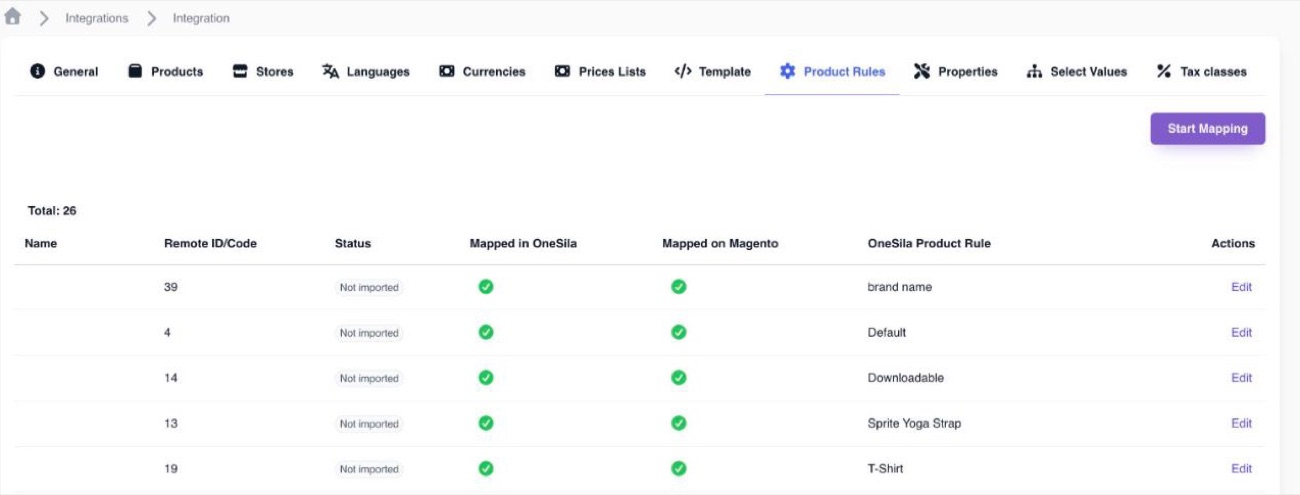
Your online store doesn't enforce a structure, so OneSila creates it from your product rules: the fields a product has, their options, and the choices a shopper makes.
| In OneSila | On your online store |
|---|---|
| Product type & product rule | The kind of product and its set of fields. An attribute set on Magento, a product type on Shopify. |
| Property | A field on the product. An attribute, a metafield. |
| Select value | An option in that field. |
| Property the customer chooses | The choice a shopper makes, like size: a product option. |
What gets sent
The properties in the product rule that have Public Information on, and a value. An empty property isn't sent.
Nobody else checks
Your store doesn't refuse an unfinished product. It shows what your rule sends. So your product rule is the only thing between a finished product page and a half‑empty one.
Marketplaces: they enforce their rules
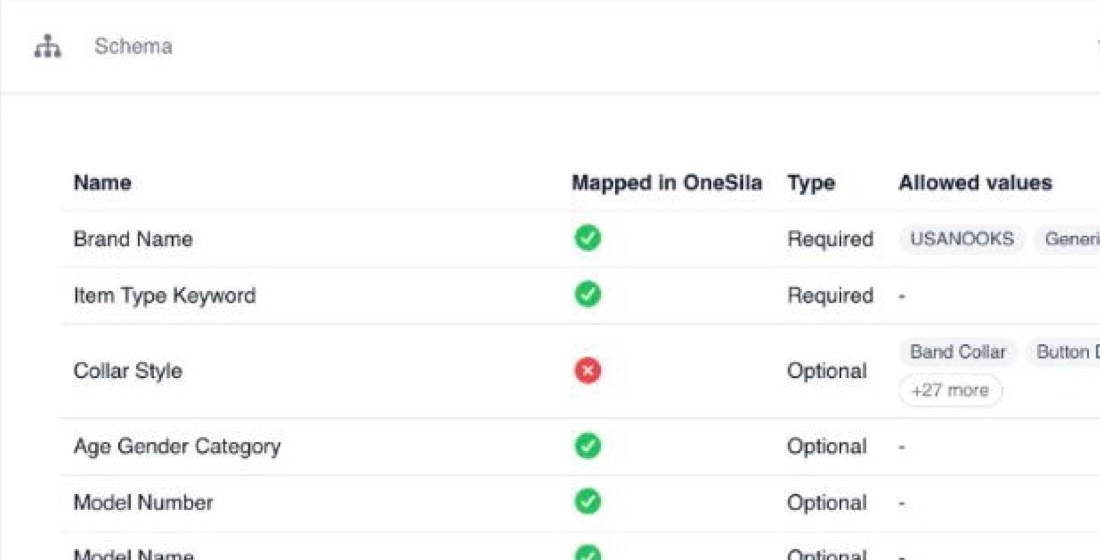
A marketplace enforces its own structure for every kind of product. OneSila can't create it there, and you can't change it. Your product has to meet it before it's listed.
Their product types
Amazon calls a T‑shirt a "Shirt", eBay files it in a category. Each comes with its own list.
Required properties
Miss one, and the product isn't listed. Even when your own rule says it's optional.
Allowed values
Often only their options are accepted. Your "Navy" has to count as one of theirs.
The marketplace wants something you don't have at all? Add it to your product rule, so you can give your products a value.
One rule for every channel, or one per channel?
The rule you know from module 2 is the Default rule. A channel can also get its own version of a rule. Where a channel has one, it uses that. Where it doesn't, it uses the Default rule.
One rule for every channel
- Little to configure. One rule per product type. You change it once and every channel follows, so nothing can drift apart.
- Marketplace details are exposed on your store. What a marketplace asks for ends up on your product pages too. "Batteries included" on a plush teddy bear, a search keyword, a tax code: clutter that doesn't help a shopper buy, and can confuse them.
- A marketplace's requirement blocks your store. If Amazon needs an age range and you make it Required, a product without one doesn't go to your own store either, though your store doesn't need it.
A rule per channel
- Each channel shows only what fits it. Clean product pages on your store, and the extras only where a marketplace demands them.
- Requirements stay where they belong. A marketplace's demand only holds back that marketplace.
- More to configure. A property several channels need has to go into each of their rules. Forget one, and the channels drift apart.
- More to check when you reorganise. The real case in “Your rules are live”, times the number of rules.
Two examples
Keep the Default rules
All your channels are your own stores. You want the same information everywhere, all the time. There's no marketplace detail that could end up in the wrong place, so a rule per channel only adds setup.
Give each channel its own rule
Amazon and Shein each ask for their own details. Those don't belong on your Shopify product pages, and a property only Amazon requires shouldn't hold back your store. With a rule each, every channel gets exactly what it needs.
The setting: Fallback to Default Product Rule

On
The channel falls back to the Default rule for every product type it has no rule of its own for.
Off
No fallback. The channel only uses rules of its own. Products whose type has no rule for this channel aren't sent.
You create a channel's own rule by picking the channel in the rule's Sales Channel field. OneSila shows how many products use the Default rule now, and asks you to confirm.
Your rules are live
Once your channels are connected, a rule change is no longer a change inside OneSila only. It reaches every channel that uses the rule.
On your online store
Shoppers see the change. Some changes go out the moment you save, others on each product's next sync.
On a marketplace
Your products are checked against their list again. Miss something they require, and the product isn't sent.
Be cautious when changing rules. They're an instruction set, not an arbitrary list.
Check yourself
6 questions
Pick one answer for each. You'll see right away if it's right, and why.
-
1On your own online store, who decides which details a product has?
Show the answer
Right answer: B. You, through your product rule. Your store has no list of its own. Your product rule becomes its setup.
-
2On a marketplace, who decides which details a product needs?
Show the answer
Right answer: C. The marketplace. A marketplace has its own list for every kind of product, and enforces it. Your product rule has to meet it.
-
3Size is Optional in your T‑Shirt rule. The marketplace requires a size. What happens to a T‑shirt without one?
Show the answer
Right answer: D. The marketplace doesn't list it. Your rule decides what's optional in OneSila and on your store. A marketplace still requires what it requires. On your store, the same T‑shirt does show up.
-
4Your property is Colour, the marketplace's is Color. What do you call linking the two?
Show the answer
Right answer: A. Mapping. You keep your own words, and link them to the marketplace's once. The course Working with channels shows how.
-
5Fallback to Default Product Rule is off, and your store has no rule of its own for Bags. What happens to your bags?
Show the answer
Right answer: B. They aren't sent to the store. With the fallback off, the store doesn't use the Default rule. It needs a rule of its own for Bags first. With the fallback on, (A) would be right.
-
6You remove a property from a rule your online store uses. What do shoppers notice?
Show the answer
Right answer: C. It disappears from those product pages. On your store, your product rule is the setup. Take a property out, and it goes from the store too. That's the real case on page 8.
You've finished this course
Properties, Rules & Mapping
Questions about your own setup? We're happy to go through it with you.
Book a meeting