
At a glance
| PIM | Marketplace catalog tool | |
|---|---|---|
| Scope | All channels | One marketplace |
| Owns | The master product record | The listing on that marketplace |
| Core job | Centralise, validate, distribute | Optimise, monitor, comply |
| Works for | Webshop, marketplaces, retail, print | Amazon, bol.com, or another single platform |
| Typical user | Product and e-commerce teams | Marketplace managers |
| Without the other | Still publishes to every channel | Holds the only copy of your product data |
What marketplace catalog tools do well
Marketplace catalog tools are specialists, and good ones earn their place. They know one platform deeply: Amazon's category requirements, bol.com's content rules, the exact image specs and attribute limits that get listings approved. They track buy-box positions, monitor content changes, flag suppressed listings and manage reviews. Some handle repricing.
None of that is PIM work. A PIM does not chase the buy box. If a marketplace is a large share of your revenue, a specialist tool for that marketplace can pay for itself.
The catch: much of this list is migrating into modern PIMs.
What breaks when catalog tools become your source of truth
The problem starts when the catalog tool holds the only copy of your product data.
Each tool holds its own version. Your Amazon tool has one description, your bol.com tool another, your webshop a third. Nobody knows which one is correct. Fixing a product means fixing it three times, in three interfaces, in every language.
Data drifts. A team member updates the Amazon listing during a promotion and nobody copies the change back. Six months later the same product tells three different stories on three channels.
New channels start from zero. Adding a marketplace means rebuilding your catalogue by hand, because there is no master version to publish from. What should take days takes months.
None of this means the tools are bad. It is the setup that produces the drift, and the setup is what you can change.
The setup that works: one master version, native marketplace management
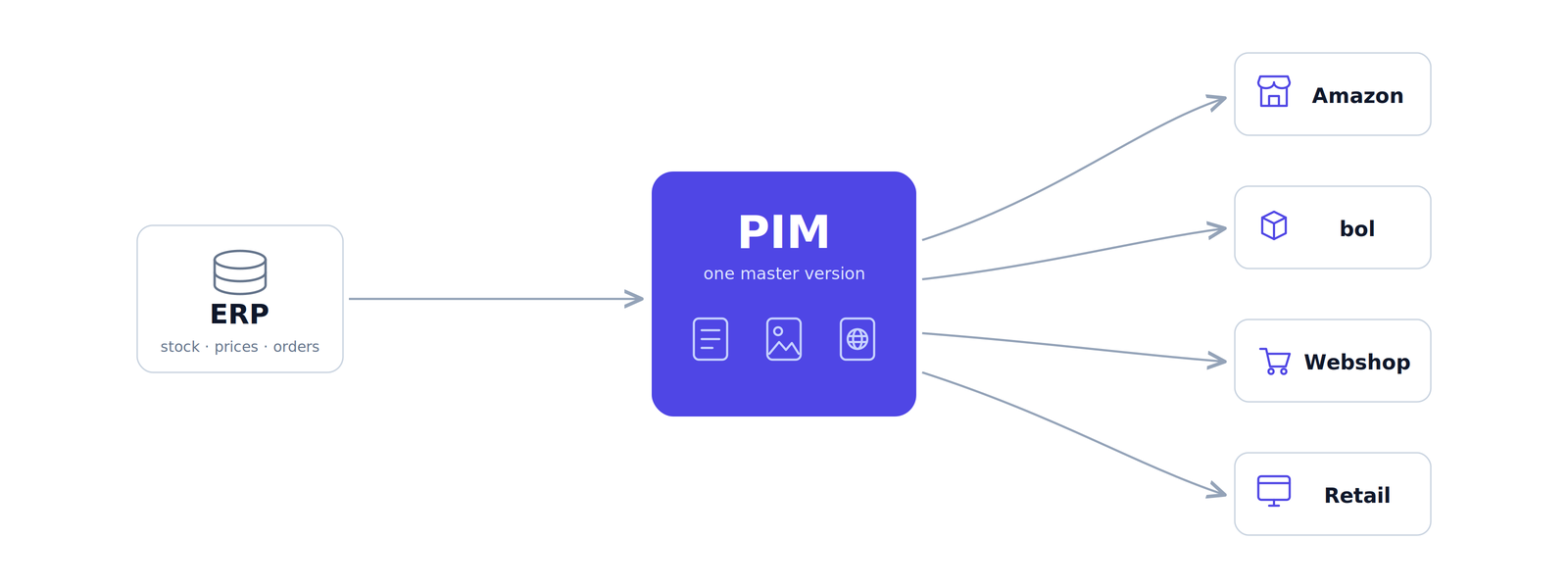
The fix is one master version that feeds every channel. The PIM holds the master record: validated attributes, approved images, all languages. It publishes to each channel in the format that channel requires.
The traditional answer was to run a separate listing tool on top for each marketplace. That answer is ageing. Modern PIMs increasingly manage marketplace listings natively: category mapping, attribute validation, content sync, suppressed-listing recovery. When the PIM does the listing work itself, the separate tool becomes a second copy of your data with a monthly fee attached.
OneSila customers often replace their marketplace listing apps entirely: the PIM holds the master version and manages the Amazon and bol.com listings from the same place. A standalone tool then only earns its seat for narrow specialist work such as repricing or marketplace advertising.
Who owns what:
| Task | System |
|---|---|
| Master product data, translations, media | PIM |
| Publishing to each channel's format | PIM |
| Data validation and completeness checks | PIM |
| Category mapping, content sync, suppressed-listing recovery | PIM (native marketplace management) |
| Buy-box, repricing, review management | Catalog tool |
| Marketplace advertising | Catalog tool |
When PIM alone is enough, and when you need both
A PIM with native marketplace management covers most sellers completely. The master record, validation, translations, publishing, and the listing management that used to need a separate app. You are in this group if your marketplace work is mostly keeping listings correct, complete and current: right attributes per category, right images, right translations, no suppressed listings. That is data work, and data work belongs in the system that holds the master version. If you are in this group and still paying for a listing app, it may be worth checking what it does that the PIM does not.
Add a specialist tool when one marketplace is a business of its own. The signals: repricing runs all day against named competitors, the buy box decides a meaningful share of your revenue, or you manage marketplace advertising and want it next to the listing data. None of that is master data work. A repricer does not care what your product weighs; it cares what your competitor charged four minutes ago. Keep the PIM as the source of truth and let the specialist tool do the one job it is built for.
A catalog tool alone only works in one narrow case: you sell on a single marketplace, you have no webshop, and you have no plans for either to change. The moment a second channel appears, every product exists twice with no master version, and you pay the difference in hours: re-entering data, reconciling versions, and launching channels months late. If a second channel is on the roadmap, start with the master version, not the workaround.
The short version:
| Your situation | What you need |
|---|---|
| Multiple channels, listing work is data work | PIM with native marketplace management |
| One marketplace dominates, repricing or ads run daily | PIM plus a specialist tool for that job |
| One marketplace, no webshop, no growth plans | Catalog tool alone is defensible |
| Second channel on the roadmap | PIM first, before the data forks |
FAQ
What is the difference between a PIM and marketplace catalog management software?
A PIM manages product information for all channels from one central source, while marketplace catalog management tools manage listings inside one specific marketplace, such as Amazon or bol.com. The traditional setup ran a listing tool on top of the PIM for each marketplace. Modern PIMs increasingly manage marketplace listings natively, combining both functions in one system and leaving standalone tools only for specialist work such as repricing or marketplace advertising.
Can a marketplace catalog tool replace a PIM?
No. Catalog tools manage one marketplace's listings and hold no master record for your other channels. Sellers who use a catalog tool as their only product data system end up maintaining separate versions per channel, which causes drift and errors.
Can a PIM replace a marketplace listing tool?
Yes, if the PIM manages marketplace listings natively. A PIM with built-in category mapping, attribute validation and content sync does what a listing app does, from the master record instead of a separate copy. Standalone tools remain useful for repricing and marketplace advertising.
Do I need both a PIM and a catalog management tool?
Most multi-channel sellers need the PIM; the catalog tool is optional. Add a specialist tool when a single marketplace justifies deep optimisation such as repricing or buy-box management. Often you need neither both nor two systems: a PIM with native marketplace management covers publishing and listing management, leaving specialist tools only for repricing or advertising.
What is the best way to manage product listings on multiple marketplaces?
Keep one master version of every product in a PIM and publish each marketplace's required format from it. This prevents the data drift that comes from editing listings separately in each marketplace's own tools.
Can a PIM publish directly to Amazon and bol.com?
Yes, if the PIM has native marketplace integrations. The PIM maps your master data to each marketplace's category and attribute requirements and keeps listings in sync when products change.