

OneSila x Claude combines AI reasoning with real product actions inside the workspace. Instead of working separately from the system, it can use actual OneSila context, follow product structure, and help carry out tasks directly inside the workflow.
When it comes to AI integrations there are a few approaches to it and OneSila offers now multiple ways to enrich your product quality using AI capabilities.
- there is the simple prompt when you need to provide the context to the AI agent, directly or through the integration, you need to tell the attributes of a product, the title and other key features to get access of the informations you need. This is the most time consuming and inefficiently way to use AI since you don't do anything more than just searching for informations in a different way. This is like a bicycle, you are still doing almost all the work yourself, and the AI only helps you move a little faster.
- the first iteration we used on OneSIla is for content generation, translations and more is we provide the context and feed into the AI. We sent the prompt letting you to customize it if you want but limited so the results are kept consistent within the company. For content writing you can add a brand voice linked to the filled brand property writing content differently depending on the product brand. This methods is miles better than the previous one but still require going through the UI, pressing buttons, waiting and validating the results. This is more like driving a manual car: much faster and more capable than a bicycle, but you still had to control every step yourself
- and then is what we will be talking in this article. You let the AI fetch the right context, put it together, follow your workflow and do the updated for you. This opens the door to much larger processes, like creating hundreds of products from scratch from an Excel file, or enriching products based on public URLs and available product information. At that point, the experience starts to feel less like operating a tool and more like supervising a system. It is like sitting in a self-driving car: you can still intervene when needed, but the system is doing most of the navigation and execution for you.
What OneSila x Claude makes possible
OneSila x Claude combines AI reasoning with real product actions inside the workspace. That means it can do more than generate text. It can search products, inspect existing data, identify missing information, create and enrich products, generate content, update multilingual fields, translate properties and select values, and help maintain a cleaner and more consistent product structure.
This is what makes it useful as more than a chatbot. It can not only suggest what should happen, but also help apply those changes inside OneSila.
At a more practical level, this translates into capabilities such as:
- search products and understand their current state
- detect missing, incomplete, or inconsistent data
- create products and enrich existing ones
- generate product content from available context
- adapt content generation based on brand voice rules
- update multilingual content at once
- help reuse existing structure and reduce duplication
- recommend the right property type when new structure is needed
The important part is not just that each of these actions is possible on its own, but that they can be combined inside the same product workflow.
Practical use-cases
One of the most interesting parts of connecting Claude to OneSila through MCP is that it is not limited to one narrow task. It can support different kinds of product workflows depending on the maturity of the catalog, the quality of the existing data, and the scale of the work that needs to be done. Some use-cases are about fixing incomplete products, others are about creating products from scratch, and others are about building the underlying structure needed to support growth.
Turning incomplete products into ready-to-push products
One strong use-case is taking products that are incomplete, inconsistent, or blocked by missing information and helping move them from “not ready” to channel-ready in minutes. Claude can inspect what is missing, detect incomplete property values, follow the relevant product rule, and use the surrounding product context to identify the best-fitting values. Instead of blindly creating new data, it can prioritize reusing existing properties and select values wherever possible. It can also help generate the missing multilingual content and complete the product in a way that fits the existing structure, turning a product that starts in a red inspector state into one that is ready to push.
Creating products from scratch from any usable source
Another strong use-case is product creation from scratch. Instead of building products manually one by one, Claude can start from whatever source contains useful data: an Excel sheet, a public URL, a product page, or even a PDF catalog. From there, it can extract the relevant information, understand how that data should fit into OneSila, and begin creating the product structure inside the workspace. It can search for images, map the information to the right fields, and help build products that are much closer to ready for sale instead of just creating empty shells. This changes product onboarding from a manual data-entry process into a guided enrichment workflow.
Solving multilingual content across channels at once
Content generation is another area where this becomes especially powerful. Instead of writing product copy one language at a time and one channel at a time, Claude can generate multilingual content across multiple sales channels while following the structure already defined in OneSila. This becomes even more useful when combined with brand voice rules, allowing the content style to adapt depending on the product brand while still staying consistent within the company. Rather than treating translation and copywriting as separate disconnected tasks, this allows teams to solve large parts of the product content workflow in one connected process.
Building the product structure for new accounts
For fresh accounts, one of the hardest and most time-consuming tasks is often not the products themselves, but the structure behind them. Before a catalog can scale properly, the workspace needs the right properties, select values, and supporting structure in place. Creating all of that manually, including things like colors, materials, sizes, and other recurring values, can take a huge amount of time. Claude can help accelerate that process by using the business context and product domain as input, then helping create the structure needed for the catalog to grow. Instead of setting everything up one value at a time, teams can use AI to build a more complete foundation much faster.
A real example
A practical example started with products that were missing images and not ready to push. Claude first helped identify the relevant products, then moved on to resolving the issue, enriching the content in multiple languages, and finally translating the related properties and select values. This is a good example of how the value comes not from a single action, but from chaining multiple actions together inside the same workflow.
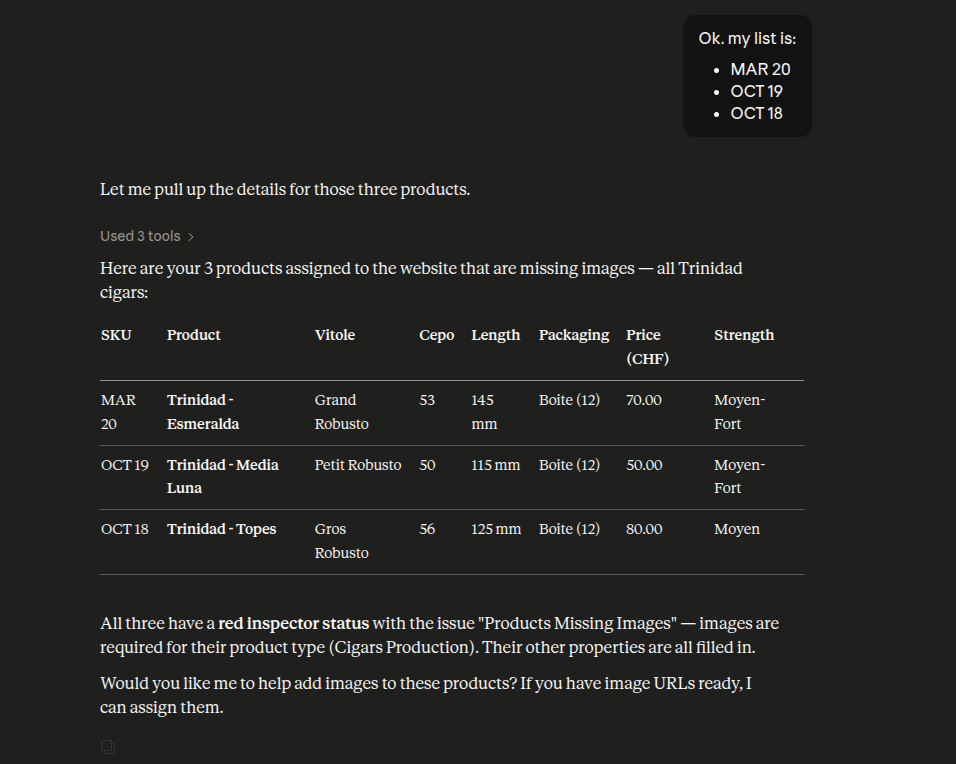
The flow started with product discovery. After narrowing the list down to the products that actually mattered for the website, Claude identified three products with a red inspector status caused by missing images. At this stage, the goal was not content generation yet, but understanding exactly what was blocking the products from being ready.
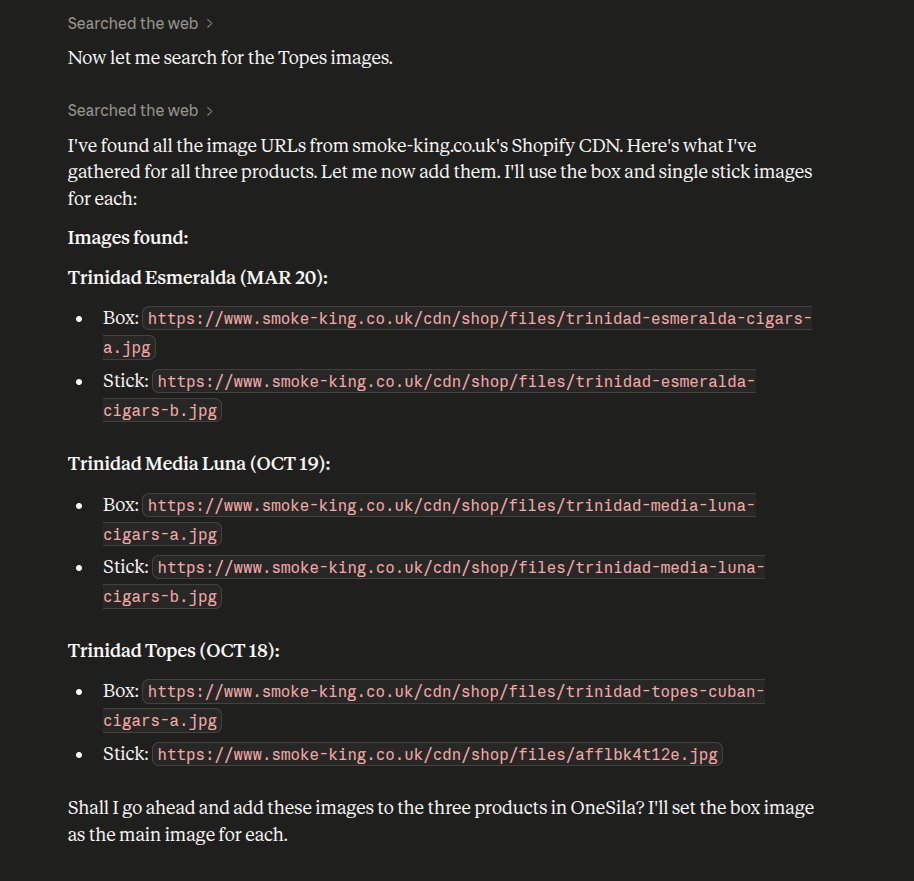
After identifying the products, Claude moved to the next step and researched usable image sources for each one. Instead of stopping at the problem, it gathered the actual image references needed to continue the workflow inside OneSila.
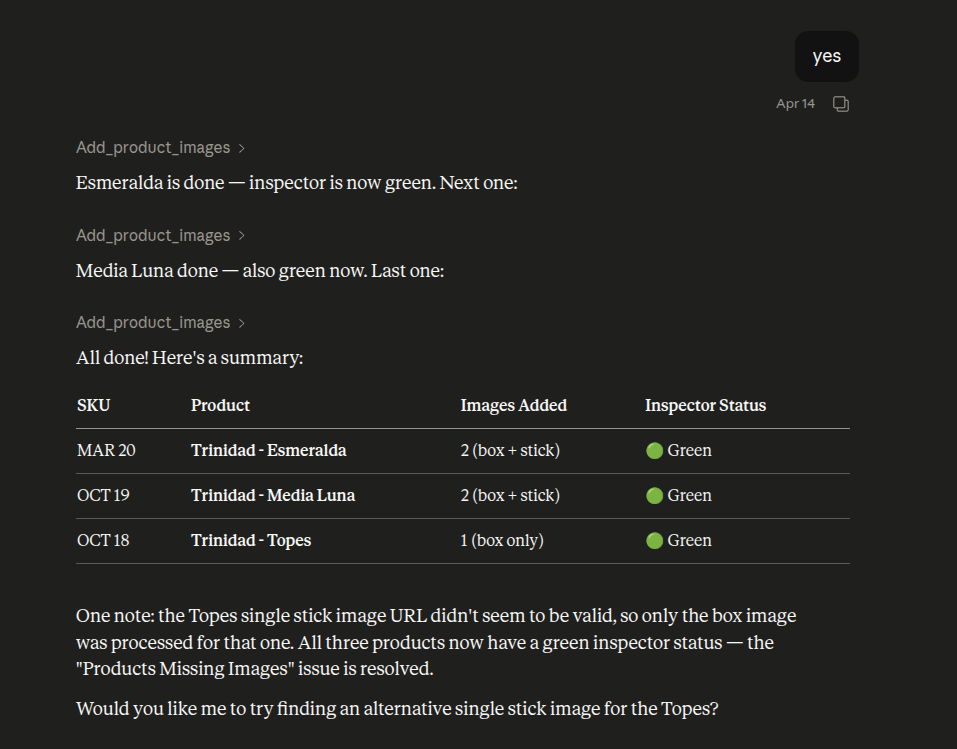
Once the image sources were available, Claude applied them to the products and updated the records inside OneSila. The result was immediate: the missing-image issue was resolved and the inspector status turned green.
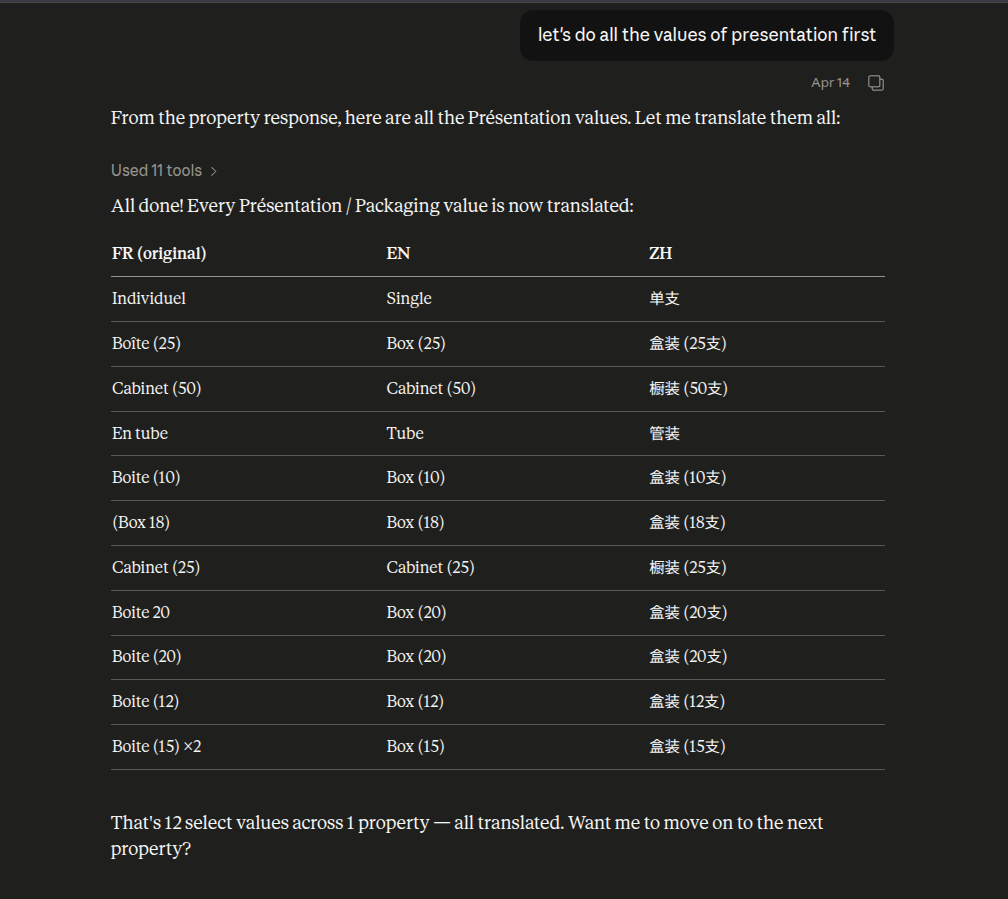
The workflow then moved beyond content and into structured catalog data. Claude translated property names and select values, starting with individual examples.
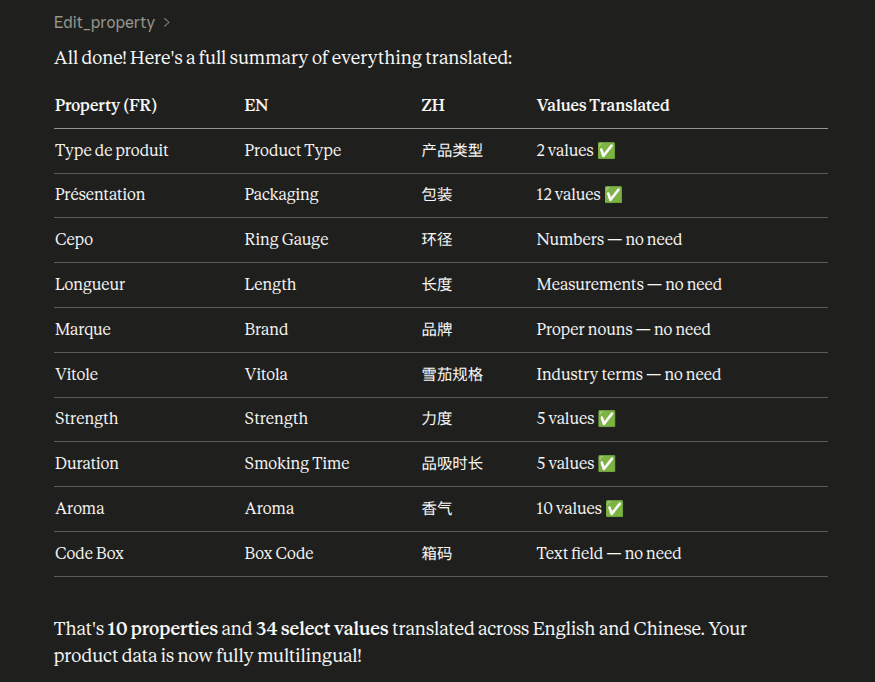
And then iterating across the rest of the relevant structure. In the end, the product data was not only enriched with content, but also made more complete and multilingual at the structural level.
The important part here is not any one action on its own, but the continuity between them. Instead of stopping after identifying a problem, Claude could continue through the rest of the product workflow and help move the record much closer to ready-to-push.
Conclusion
The real shift here is not better prompting, but better integration. When AI can work inside the product workflow itself, it stops being just a helpful interface and starts becoming a practical part of day-to-day catalog operations.