
The ecommerce tech stack as a map: three flows, four owners
An ecommerce tech stack is the set of systems that move three kinds of data, each in its own direction. Product facts move out, from the product information management system (PIM) to the storefront and the marketplaces. Orders move in, from the channels to the order management system (OMS) and on to the warehouse. Stock moves across, from the warehouse management system (WMS) or stock tool, through the OMS, back out to every channel. The enterprise resource planning system (ERP) sits beside all of this and keeps the books.
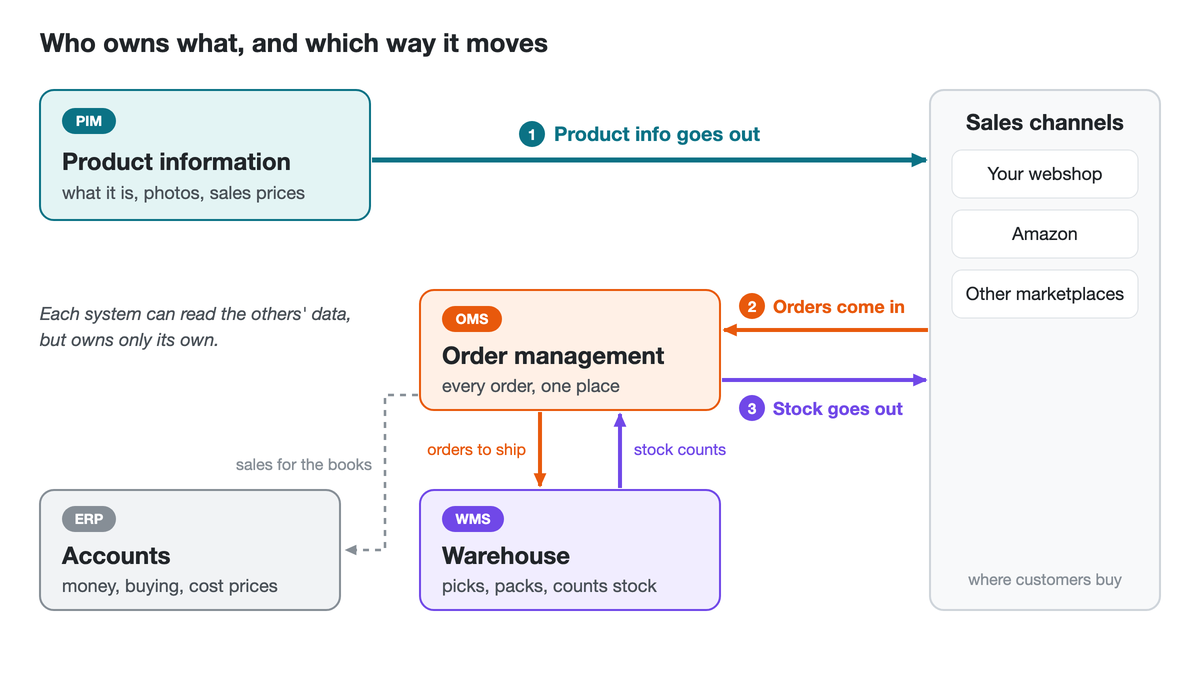
Think of a restaurant. The menu is the PIM: what each dish is, how it is described, what it costs. The order tickets are the OMS. The kitchen and the pantry are the warehouse and the stock. The accounts are the ERP. Nobody writes the menu in the stock book.
Underneath sits a simple split. A PIM is a commercial tool: its job is to sell the product well on each channel. The OMS, the WMS and the ERP are operational: they move, count and account for the goods. A list of tools tells you what to buy. The arrows tell you which system owns which data, and so where to look when something goes wrong.
What each system owns: PIM, OMS, WMS and ERP
The PIM owns what the product is, the OMS owns the orders, the WMS owns the physical goods and the ERP owns the money. Each may read the others' data, but it owns only its own.
| System | Owns | Reads from others |
|---|---|---|
| PIM (product information management) | Attributes, content, images, sales prices per channel | SKUs, stock signals (optional, see below) |
| OMS (order management) | Orders from every channel, routing, stock shown per channel | Product facts, physical stock |
| WMS (warehouse management) | Picking, packing, shipping, stock counts | SKUs, weight, dimensions |
| ERP (enterprise resource planning) | Finance, purchasing, cost prices | Orders, invoices |
Next to that, an ERP product record is often little more than a SKU (the product's stock code), a name, sometimes a price, and a stock quantity. Our PIM vs ERP post covers that boundary in detail.
In smaller stacks one tool often does the OMS and WMS jobs together, which is fine: the flows stay the same when two boxes merge. Whether you need an ERP yet is a separate question.
And where does the storefront sit? Shopify or WooCommerce has product, order and stock screens of its own, so it can look like a PIM and an OMS already. It is neither. On the map, the storefront is a channel: one of the places product facts go out to and orders come in from. Its screens do those jobs for the storefront only. Once a marketplace is added next to it, someone has to do them across both, and that is often where the separate boxes start to earn their place.
And the CRM? It holds your customers and your deals with them, which matters a lot if you sell to trade buyers. It sits beside this map rather than on it: it may read orders, but it owns none of the three flows.
Why not let one system hold everything? Because the data moves at different speeds. Product data is cold: attributes and content may change once a quarter, prices on a schedule. Stock and orders are hot: they change with every sale and shipment and need handling in near real time. A system built for one rhythm tends to struggle with the other, which is why we answer does a PIM manage inventory? with "not stock levels".
None of this means every seller needs four systems. With one channel and no plan to add another, the ERP or the storefront's own product pages may well be enough. A second channel, or even the plan for one, is usually where the product job outgrows them.
Blurred lines: price, stock signals and listing modules
The map is clean on paper. Three places tend to blur it in practice.
Price goes where the listing goes. A channel listing cannot go live without a price, so the system that publishes the listing needs the sales price, general and per channel. Cost price stays operational, in the ERP or the order and warehouse system. In OneSila, a price list is set up once and attached to the channels that use it, so the same product can carry a different price on each connected channel, for example a few pounds more on free-shipping marketplaces.
Stock signals, not stock counts. A PIM may read stock and sales signals from the ERP or OMS, for example to suggest an in-stock alternative or to rank related products. That is reading, not owning. Owning live stock counts for the storefront is something else, and it can turn the PIM into an unreliable stock report while the warehouse system stays the real record anyway.
Listing in order tools. Many order and warehouse tools can list products too, and with a small range on a couple of channels that may be all you need. As the range and the channel count grow, the question becomes where the full product record lives: the content, attributes and prices for each channel. It helps to give that record one home and let the other systems read from it.
One arrow does run backwards, and that is fine: the order and warehouse side usually needs weight and dimensions from the product record. Reading them is not owning them.
The pattern behind all three: stack pain often starts when one system is asked to carry another system's data.
Where products are born: two creation flows
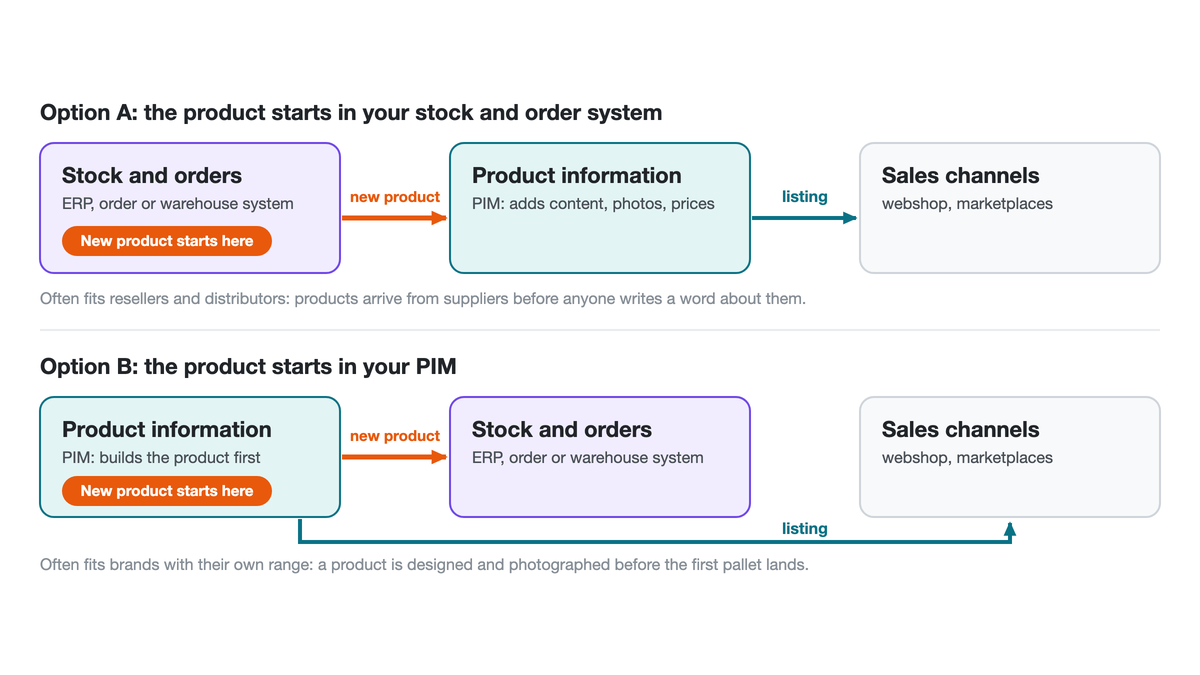
A new SKU has to start somewhere. There are two common flows, and both work.
Warehouse or ERP first. Buying creates the SKU. The purchase order or the goods-in process sets it up in the ERP or warehouse system, and the PIM picks it up and adds what makes it sellable: content, images, attributes and channel prices. This often fits resellers, distributors and parts sellers, where products arrive from suppliers before anyone writes a word about them.
PIM first. The product team builds the product before stock exists. The PIM creates the SKU, then pushes it down to the ERP or warehouse system and out to the channels when it is ready. This often fits brands launching their own range, where a product is designed, named and photographed long before the first pallet lands.
How products arrive in your business can make one of these feel natural. Neither is wrong. A PIM vendor may prefer PIM-first, but that is a preference, and a warehouse-first flow that already works is a sound one to keep.
Bundles tend to break the pattern. A bundle is a selling idea: it exists only as a way of selling stock, not as a physical thing on a shelf. So even in a stack where physical SKUs start in the warehouse system, bundles often start on the selling side, in the PIM.
Either way, the order side still has work to do. Bundles and alias products (one physical product listed under a second SKU) have to be mapped in the order system back to the real SKUs, so a sale deducts the right stock and the warehouse picks the right items. Choosing PIM-first does not remove that step. Some order systems handle it out of the box: the first sale of an alias SKU prompts a mapping, and later orders follow it. Others may need custom integration work.
Buying order: what to put on rails first
Here is advice a PIM vendor has little reason to give: sort out orders and stock first, or at the same time as the PIM.
The reason is dependency. A PIM does not process orders or keep stock. It publishes product data on top of a foundation where orders are processed and stock is correct across channels. Otherwise the team keeps doing the manual work the new system was meant to remove, such as setting sold-out items to zero on each channel.
If stock and orders still run on spreadsheets, the sequence we suggest is:
- Warehouse and shipping: get goods out of the door reliably.
- Stock across channels: make sure each channel shows the right number.
- Listing: put the catalogue on every channel from one product record.
- Full throttle: add channels and products on rails that already work.
Each step rests on the one before. Listing is where growth comes from, which is why it is tempting to start there. Started first, it multiplies the number of channels on which stock can be wrong. The goal is to put the work on rails: each order, stock change and product update following the same route through connected systems, without someone carrying it by hand.
Stock across channels gets harder if you also sell wholesale. Trade buyers and consumers then draw on the same stock, and trade often comes first. That is where stock rules per channel earn their keep: show a marketplace ten units even when a thousand are in the warehouse, because trade orders will need most of them before the next delivery lands. Those rules live on the order and stock side, not in the PIM.
Sellers who already run an order and warehouse setup are often past step two. For them the PIM is the next layer, and the trigger tends to be the second or third channel rather than the SKU count.
"First" does not have to mean a year apart. When a business is already changing its order and stock systems, it is often worth bringing the PIM in during the same stretch. The team is already used to change. Finishing the journey and then working on the new rails may cost less disruption than reopening the change a year later. Whether that fits depends on the case.
Two common mistakes: the missing stock side and the unprepared start
Two mistakes come up often when sellers put a PIM into the stack.
The first is missing the stock side. Once a buyer sees one system push product data to every channel, it is natural to assume the same pipe runs backwards: if the last unit sells on one marketplace, surely the PIM takes it down everywhere? In OneSila it does not, and in most setups it is not the PIM's job at all. Tools that do push stock to every channel are usually order tools with a listing module on top. Keeping stock right is the order side's job, and if nobody plans who does it, the risk of overselling stays with nobody.
The second is jumping in unprepared. A PIM multiplies whatever structure it is given. In one onboarding, an eager team changed product types (the sets of attributes that define a kind of product) while channels were live, and about a tenth of the catalogue was restructured on those channels before anyone noticed. The other common snag is people. The one person who knows the ERP and the category manager who knows the data are essential to the project, and often have no free time. Preparation names them before anything starts.
Where OneSila sits in the stack
Take one real stack. The seller runs one system for order management and the warehouse. Before OneSila, listing was done by hand: Amazon flat files, and staff updating each channel one by one.
So the work split along the flows. The order and warehouse system kept orders, stock and cost. OneSila took product creation, updates and maintenance, and the rollout of those products across marketplaces and websites. OneSila does no stock keeping and no order processing, which is why the buying-order advice above starts with orders and stock.
OneSila also holds the sales prices, some general and some set per channel, and publishes them with the product. Cost stays on the order side.
Both creation flows run in this stack at once. Physical SKUs mostly start in the order and warehouse system. Bundles start in OneSila, because a bundle is a selling idea, and are mapped back to the real SKUs in the order system. SKUs born in another system reach OneSila in one of three ways, chosen case by case: a custom app or integration, a feed from the other system imported on a schedule, or OneSila's webhooks. If marketplaces carry most of your sales, what a marketplace PIM does that a listing tool doesn't goes deeper on that side.
The payoff is throughput. When product data is well structured and already in a PIM, a new channel can take days to weeks. In a PIM but still needing work, months. Not started, probably years. With orders and stock on rails underneath, the next channel can become a product question rather than a plumbing project.
That is the difference between adding a channel next month and adding one next year.
Frequently Asked Questions
What is the difference between a PIM and an OMS?
A PIM manages what the product is: attributes, content, images and sales prices, published out to each channel. An OMS manages orders: it pulls them in from every channel, routes them to the warehouse and controls how much stock each channel shows. The PIM sends product facts out, the OMS brings orders in, and sellers on several channels often need both.
Does a PIM replace an OMS or a WMS?
No. A PIM does not process orders, keep stock counts or run picking and shipping. What a PIM often replaces is the listing work: flat files, per-channel listing tools and channel managers copying data by hand. The OMS and WMS keep doing their jobs, and the PIM publishes product data on top of them. OneSila, for example, does no stock keeping or order processing.
Should products be created in the ERP or the PIM?
Either can work. Warehouse or ERP first suits businesses where buying creates the SKU, such as resellers and distributors. PIM first suits brands that design and launch their own products before stock exists. Neither is wrong, and how products arrive often makes one feel natural. In both flows, bundles and alias products still need mapping in the order system back to the real SKUs.
Which system should hold the selling price?
The system that publishes the listing, because a channel cannot go live without a price. That usually means sales prices, general and per channel, sit in the PIM and are published with the product. Cost price stays operational, in the ERP or the order and warehouse system. Split this way, each channel can carry its own price without touching the books.
Which system should I buy first?
Sort out orders and stock first, or alongside the PIM. If you are still on spreadsheets, the order is warehouse and shipping, then stock across channels, then listing. A PIM publishes on top of correct orders and stock, and without them the manual work continues. If you already run an order and warehouse system, the PIM is often the next layer, typically when a second or third channel arrives.
What does it mean to put an ecommerce stack on rails?
A process is on rails when it runs through connected systems along a fixed route, so each order, stock change or product update follows the same path without someone carrying it by hand. It describes the end state of a stack project: not a set of tools bought, but work that no longer needs a person at every hand-off between the PIM, the order system and the warehouse.